Arlvion · Lending and financing platform
Run financing without the spreadsheets.
Arlvion is built for lenders, from phone and device financing to other kinds of credit. Each lender gets its own secure workspace for customers, loans, repayments and collections, hosted and supported by Arltech.
Inside Arlvion
The screens your team works in every day
Who it's for
Built for every kind of lender
Whatever you finance, the workflow is the same: approve the right customers, collect on time and know where every shilling is.
Phone and device lenders
Sell smartphones, tablets and other devices on credit, with each device tracked against its contract.
Microfinance and loan providers
Run loans through the same onboarding, repayment and collections workflow.
Asset and pay-as-you-go financing
Finance solar kits, appliances and other assets that customers pay off in instalments.
How it works
From application to final payment
Five stages every account goes through, and what Arlvion gives your team at each one.
Stage 01
Apply and vet
Decide faster, with every decision on record.
Sales staff capture the application at the branch. Vetting follows a checklist, so every approval or decline has a reason behind it.
What's included
- Applicant details, ID and documents in one record
- Reference calls logged against the application
- Vetting checklist with an approve-or-decline trail
- Applications waiting on a deposit, tracked until paid
Stage 02
Set up the contract
One contract record, whatever you finance.
Pick a device from your catalogue or set up a loan, and Arlvion builds the repayment plan around it.
What's included
- Catalogue of devices and products with model, specs and price
- Deposit, total price and balance on every contract
- Daily, weekly or monthly repayment plans
- A contract number that follows the account for life
Stage 03
Collect payments
Payments land on the right account, without retyping.
Mobile money payments arrive and move through a clear approval flow before they touch a customer's balance.
What's included
- Mobile money payments matched to contracts
- Pending, verified, approved and posted, with rejections recorded
- Cash and manual payments recorded by staff
- What's expected today and this week, against what came in
Stage 04
Follow up arrears
Arrears are caught in days, not at month end.
The call centre works from a collections list, and every overdue account has a clear next step.
What's included
- Collections worklist for the call centre
- Alerts for accounts due today and overdue
- Locked, repossessed and written-off statuses
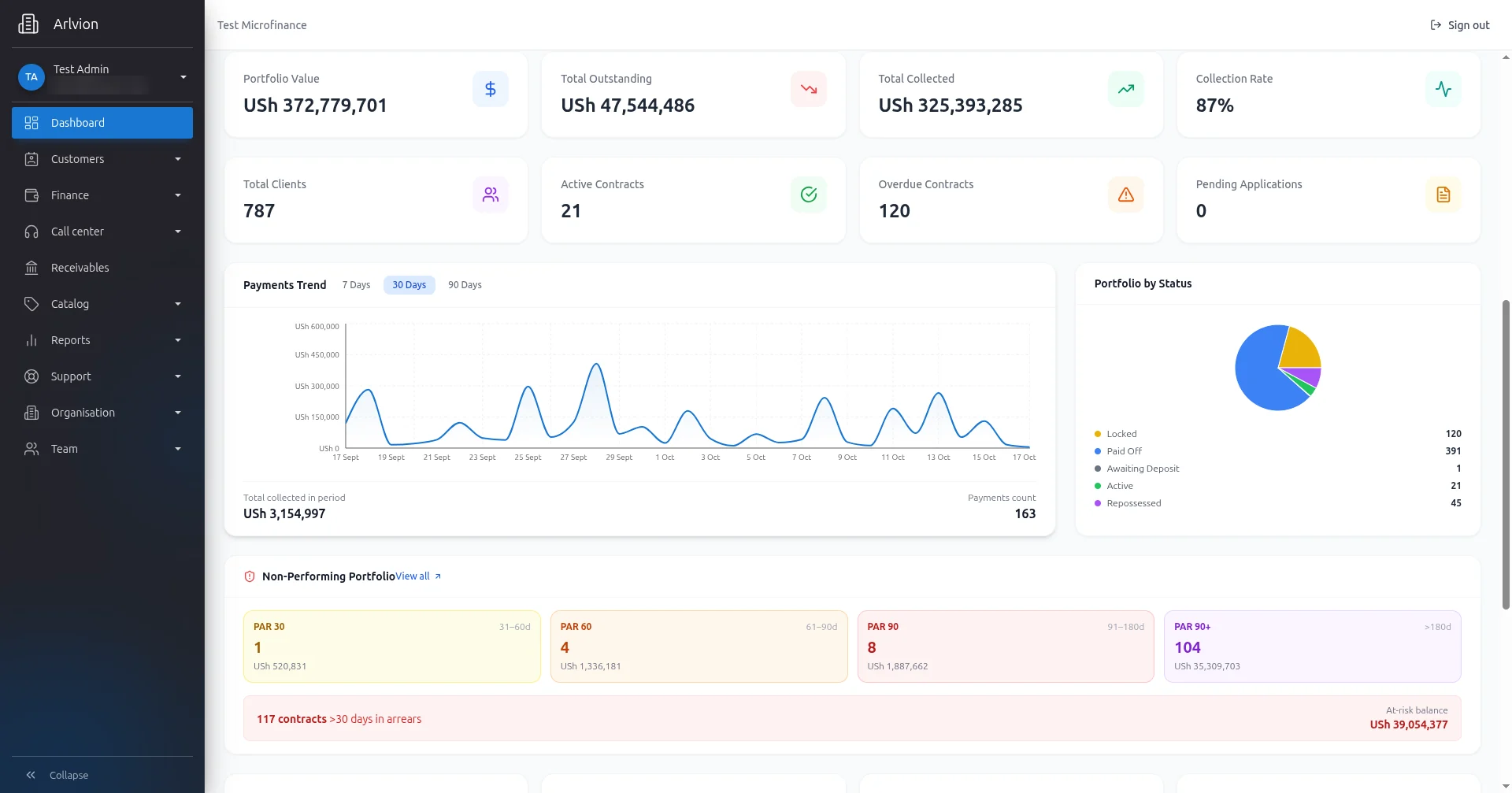
- Portfolio at risk at 30, 60, 90 and 90+ days
Stage 05
See the whole portfolio
Management sees the business as it is today.
Dashboards update as payments post, so nobody waits for a month-end spreadsheet to know where things stand.
What's included
- Portfolio value, outstanding, collected and collection rate
- Payments trend over 7, 30 or 90 days
- Portfolio by status and expected collections
- Reports for management, by period
Every module included
One workspace, from device sale to collected loan
Sales, finance, the call centre and management work from the same records, each seeing what their role allows. Pick a role, or select a module to see it.
- OrganisationCompany and branch settings
- TeamStaff, roles and permissions
- SupportRaise and track issues
See every module running on your own products and branches.
Tell us how many branches and customers you manage today. We'll set up a demo workspace and walk your team through it.